Search Product
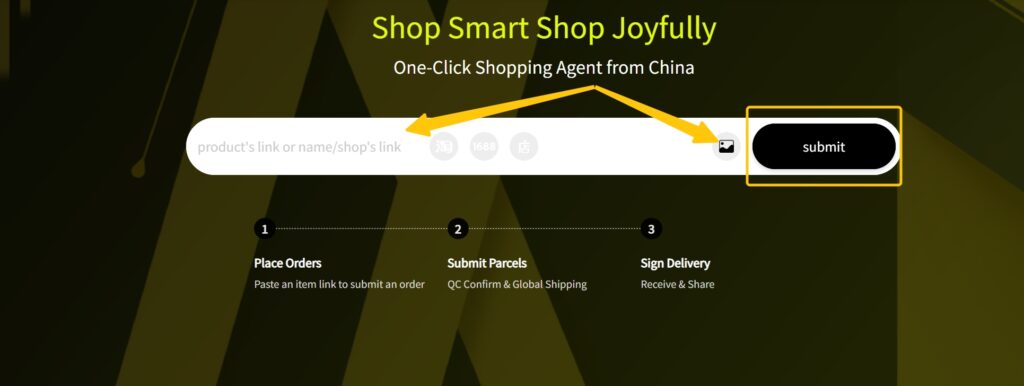
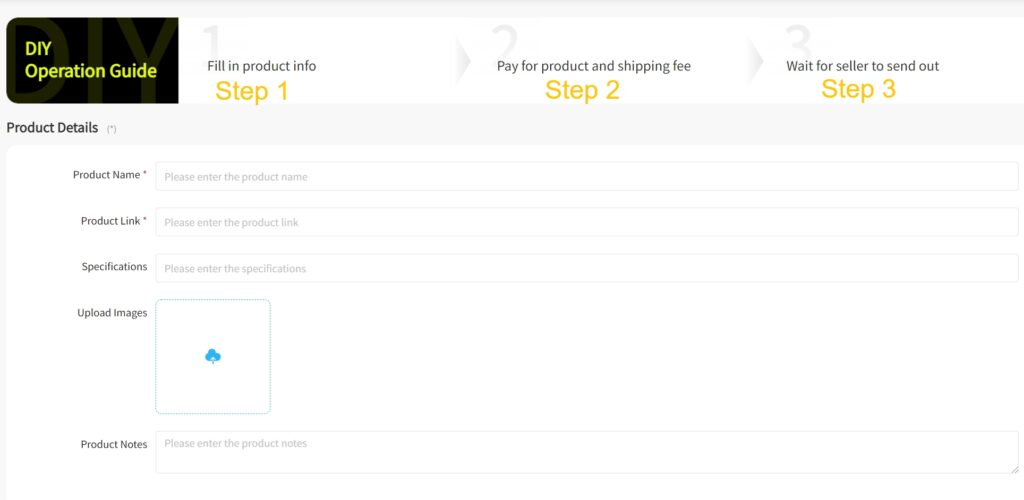
Copy the marketplace link or search on JoyaGoo. If the listing cannot be read, use DIY Order and provide the exact item details.
 JoyaGoo Spreadsheet Step GridSteps read 17 Oct 2026
Using JoyaGoo with the JoyaGoo Spreadsheet, step by step: from a catalogue card to an item in the warehouse, the arrival photos, what the bill is made of, and the point where your parcel meets the step grid.
This follows JoyaGoo’s Shopping Guidance (article 796, read 17 October 2026). The interface examples are the source article’s May 2025 images, not a claim that today’s screen looks identical.
Copy the marketplace link or search on JoyaGoo. If the listing cannot be read, use DIY Order and provide the exact item details.
Choose colour, size and quantity. Compare the selected variant with the seller’s measurements before adding it to your order.
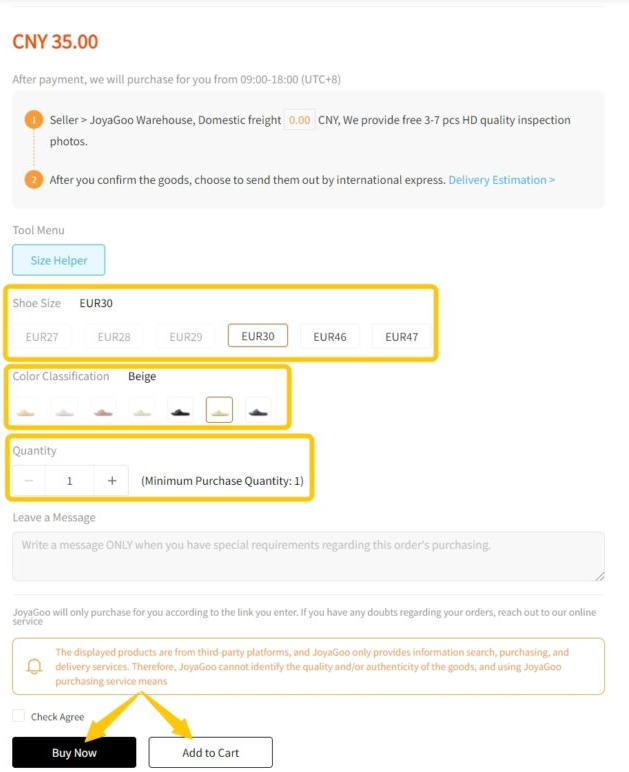
Review the goods and domestic delivery charge. This first payment does not include international shipping.
Follow Order Processing and Purchased in My Orders. Contact the buyer through the order if a requested option or price needs clarification.
Seller Sent refers to the journey to the warehouse, not international dispatch. Seller availability and dispatch can vary.
Watch Stock Arrived and QC Completed. Inspect the exact variant and visible condition. Eligible return requests must be made within five days / 120 hours from QC Completed and need seller agreement.
The free storage clock starts at Stored in Warehouse. Track it separately from the return clock; request an available paid extension before expiry. An unpaid submitted parcel has a separate 30-day rule.
Select items, confirm the address and compare current routes against the actual contents. Read all clauses, choose any extra packing, rehearsal or cover, and review the complete charge breakdown.
Choose an eligible shipping coupon and review the payable total. Coupons do not stack. A maximum-coupon estimate is not proof that your account has that saving.

Track the parcel in My Parcel. Keep the route note and payment evidence. A quiet scan is not a delivery guarantee; act promptly on exceptions, collection notices or a problem with the address.
Inspect the parcel and retain packaging if anything is wrong. Report a problem immediately under the relevant incident rule. A review or Apply Reward submission is optional and subject to current reward terms.
Every item gets a quality check on arrival, and you get photos of it. The product page promises up to seven free photos and the photo service page describes three standard ones, so expect at least three. More detailed photos can be ordered for a small fee each (detailed photo service).
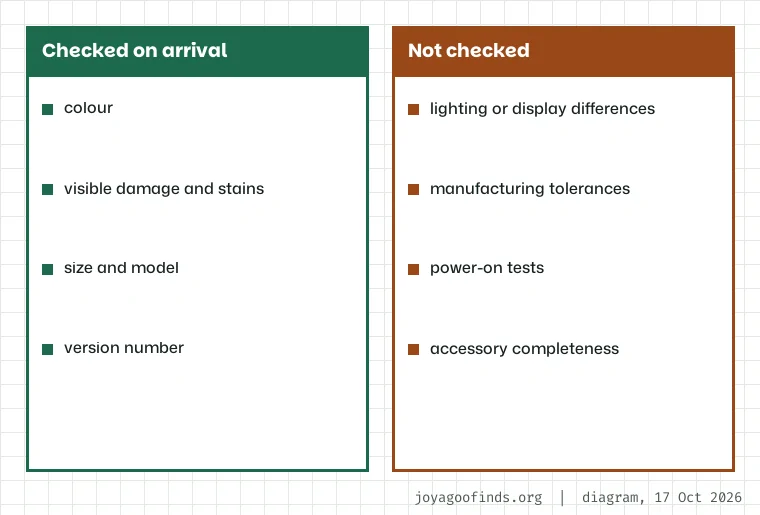
The inspection is visual and narrow. According to the inspection scope page it looks at colour, size, model and version, and at visible damage or stains. Differences from lighting or manufacturing tolerances are excluded, and electronics are judged on appearance only: no power-on test and no check that every accessory is in the box.
Read the photos as evidence you can act on, not as a guarantee. If something is wrong, the return window is short, as the next section explains.
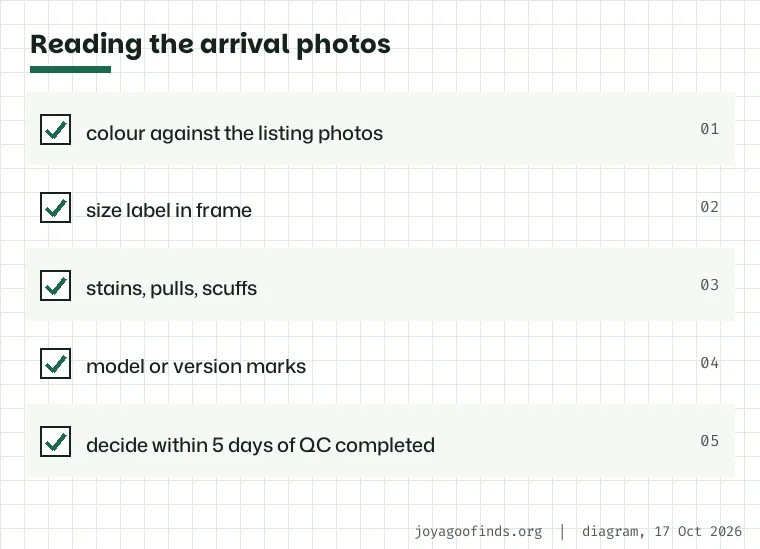
How to check QC photos: put them next to the listing and work through them in the same order each time. Colour first, remembering that warehouse lighting differs from studio lighting. Then the size label, which should be readable in at least one photo. Then damage: stains, loose threads, scuffs on soles. Last, the model or version marks if the listing names one.
If you want something returned, the clock is the return policy: five days, or 120 hours, after the order status changes to QC completed, and the seller has to agree. Return eligibility, seller agreement and fees depend on the reason and item; the refund concerns the price actually paid. Do not treat a QC concern as an automatic free return.
Some purchases are excluded from returns entirely: made-to-order goods, underwear and socks, and anything whose packaging or tags were taken off at your request. Read that list before asking for packaging to come off.
Check the received variant, labels, quantity and visible condition against the saved order. Ask for a close-up or a measured garment dimension when the ordinary views do not settle a question. Do not confuse the weight printed beside a warehouse photo with evidence that the item matches the seller’s description. Photos cannot establish authenticity or complete performance.
Resolve a possible return or exchange through the item order before arranging packing. Then choose which goods should travel together and what protection they need. Adding an item can cross a billing increment or change volume weight; removing retail packaging can affect protection and return options. Optimise the parcel only after deciding that the products themselves are acceptable.
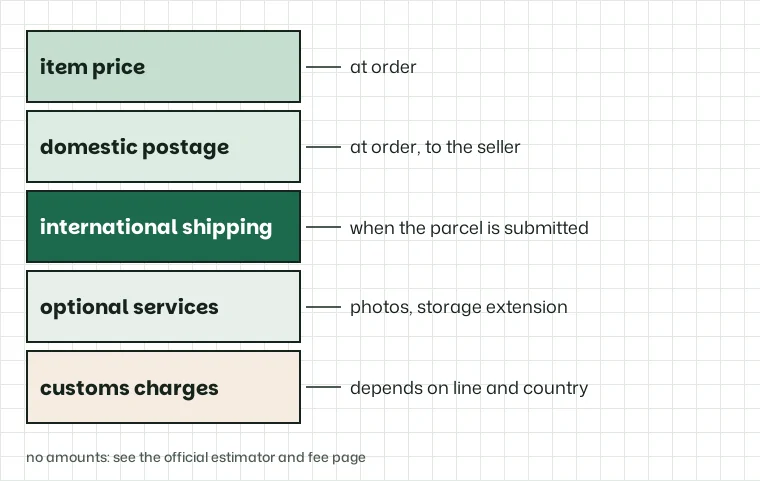
The cost breakdown has two moments. At order time you pay the item price and the seller's domestic postage, both passed on to the seller. JoyaGoo charges no service fee for buying, according to its fee page.
When you submit a parcel you pay the international shipping, which JoyaGoo says depends on weight, size, the line you choose and the destination. The estimator's totals also include fixed per-parcel charges on top of freight; we leave the amounts to the official page. Optional services and, on some lines, customs charges come on top.
Prices show in the display currency you pick, converted at the exchange rate JoyaGoo applies on its own site. Because this site shows weights rather than money, no exchange rate touches any number here.
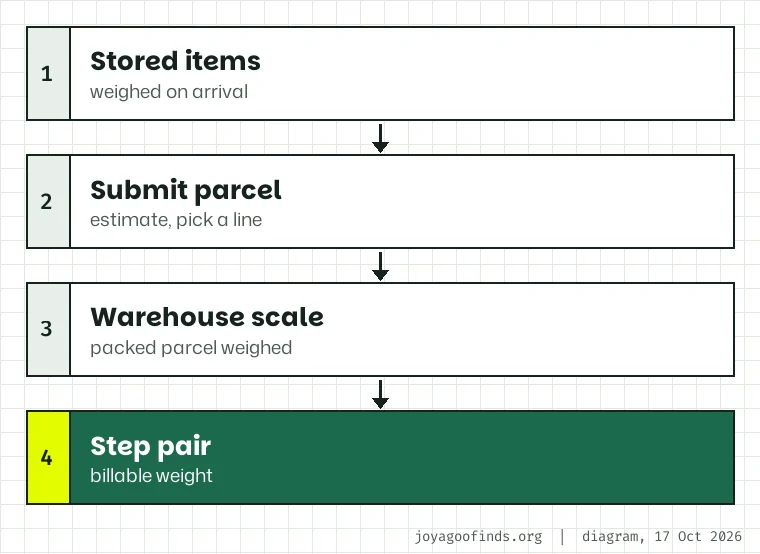
Choosing a shipping line happens when you submit a parcel: you pick the items, the estimator lists the lines that can carry them, and you pay an estimate. Each line shows a price, a transit window and a set of notes; the step pair sits behind the Detail link.
The billable weight is settled after packing. The warehouse weighs the packed parcel, the chosen line's step pair rounds that weight, and if the result differs from the estimate the difference is settled afterwards; the official guide explains the mechanics. Many lines also bill by size when that is larger than the actual weight; this site's numbers assume actual weight governs.
Before you submit, put the expected weight into the grid position finder. Knowing that 1,000 g will bill 1,100 g on most lines, or that 1,001 g bills 1,500 g on the Canadian air lines, makes the quote easier to read.
The eligible return window starts at QC Completed; the free 90-day storage period starts at Stored in Warehouse. A submitted but unpaid parcel has a separate 30-day rule. Track these separately and ask for an available extension before storage expires.
Before shipping, keep the route conditions, invoice and payable breakdown. If delivery arrives damaged or incomplete, keep the packaging and report it immediately. Official notices describe two working days for later-discovered damage evidence and 72 hours for missing, damaged or defective parcels; the insurance claim pages give seven days from signing and an outer 45-day dispatch limit. The after-sales page also warns about reports beyond three days after delivery. These have different scopes, so the longer limit is not permission to wait.
Confirm current support instructions at the official signing notice and through your parcel’s support thread. The grid does not determine a claim or insurance outcome.